Founder | Owner
Portal Overview
Keep premium virtual tours off the public internet, sell access via Stripe, and stop link-sharing with expiring URLs. Institutions get an admin dashboard to manage customers, transactions, access windows, and revocations.
Primary Goal
Protect premium content
Payments
Stripe + Stripe Connect
Best For
Museums & institutions
Access Control
Timed access + revocation
How It Works
Admin Tools Included
Common Use Cases
TL;DR: This portal keeps your virtual tours private, makes paid access painless, and gives your team real control...without duct-taping links and hoping for the best.
If you run a museum, cultural site, historic property, or institution with a digital experience worth paying for, you’ve probably wrestled with a modern problem: the internet is great at sharing… and terrible at respecting boundaries.
Virtual tours are incredible tools for access, education, outreach, and engagement. But when your virtual tour contains behind-the-scenes content, restricted archives, members-only exhibits, premium digital programming, or anything that represents your “secret sauce,” a public link becomes a liability. It gets shared. It gets saved. It gets forwarded. It ends up in places you never intended...often with zero benefit to your organization.
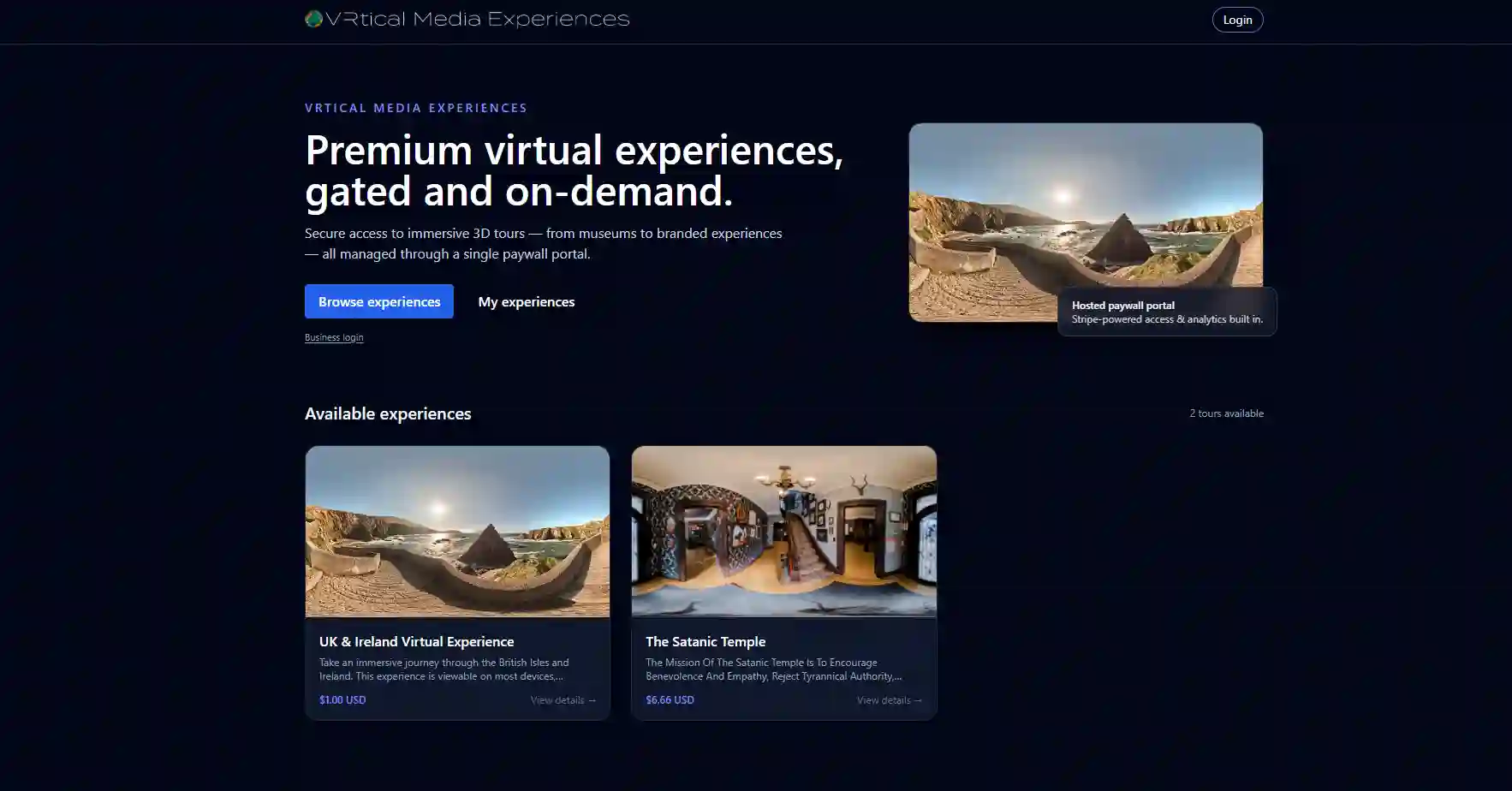
That’s exactly why the VRtical Media Paywall Portal exists.
The portal is designed to protect virtual tours from being publicly available and to help institutions monetize digital access without turning it into a manual, messy process. Visitors pay through Stripe. Funds go directly to the institution’s Stripe Connect account. Institutions get an admin dashboard to manage customers, review transaction details, set access durations, and revoke access when needed. Most importantly, virtual tours use expiring URLs, making link sharing dramatically less useful and far less permanent.
Portal URL: https://experiences.vrticalmedia.io
This isn’t “content gating” for the sake of it. This is about protecting value, controlling access, and building sustainable digital revenue around experiences that deserve it.
When a virtual tour is publicly accessible, you can’t control:
Institutions don’t just publish random content. Many virtual experiences contain curated storytelling, interpretation, educational materials, access to spaces not open to the public, archival assets, and sometimes donor-funded or grant-funded work that needs stewardship.
A public URL is basically a “copy and paste” invitation to:
If your virtual tour plays a role in revenue...memberships, ticketed exhibits, special programming, donor exclusives, digital field trips, archive access, or premium behind...the-scenes content...then access control isn’t a nice-to-have. It’s the business model.
The VRtical Media Paywall Portal gives your organization a structured way to sell and control access to virtual tours.
Instead of sending links manually, hoping they don’t get shared, and dealing with constant “can you resend the tour?” requests, your visitors get a portal account experience where access is tied to their purchase.
Here’s what it accomplishes:
1. It keeps your virtual tours from being publicly available
2. It enables paid access as a revenue stream
3. It prevents casual link-sharing using expiring URLs
4. It gives your team admin control over customers, transactions, and access
In plain terms: you stop giving away premium digital experiences for free, and you stop relying on fragile links as your security strategy.
This is the part organizations care about (and finance teams love): visitors pay through Stripe, and funds go directly into the institution’s Stripe Connect account.
No detours. No awkward manual invoicing. No “someone on staff needs to reconcile PayPal screenshots.” It’s clean and trackable.
Why that matters:
This also means your digital experiences can be treated like real products: ticketed tours, premium access passes, digital memberships, or pay-per-experience offerings...without building a custom commerce stack from scratch.
Once you’re running paid access, control becomes non-negotiable. Institutions get admin logins to the portal where they can manage and oversee access without technical headaches.
Inside the admin dashboard, you can:
This makes your digital experience manageable like a program...not like a loose link floating around your website.
Practical examples where admin controls matter:
You’re not locked into “set it and forget it.” You’re in control.
The single biggest reason paywalled access works is simple: virtual tours have expiring URLs.
A normal public tour is one link. Once that link is out, it’s out. Forever. It lives in emails, text messages, spreadsheets, group chats, and someone’s bookmarks from 2021.
Expiring URLs flip that dynamic.
With expiring URLs:
This isn’t about punishing visitors. It’s about protecting your organization from accidental (and sometimes intentional) content leakage.
If your virtual tour includes donor-only spaces, limited exhibits, behind-the-scenes content, premium interpretation, or exclusive archives, expiring links are the difference between “controlled access” and “the internet owns it now.”
Different institutions monetize digital experiences in different ways. That’s why the portal supports configurable access duration.
You decide how long the customer has access to the virtual tour. When that time limit ends, the tour disappears from the customer’s portal account.
This is powerful because it lets you shape the experience around your programs.
Common access models institutions use:
Time limits also reduce support and confusion. Instead of old links circulating indefinitely, the portal creates a clean lifecycle: purchase → access window → expiration.
It’s predictable. It’s maintainable. It’s professional.
If you’re thinking, “Okay, but what would we actually sell?”...here are common institutional use cases that fit perfectly:
Create a paid virtual version of a special exhibit, limited collection, or guided walkthrough.
Offer exclusive virtual tours as a membership perk...behind-the-scenes spaces, curator commentary, restoration projects, archive peeks.
Sell timed access for classrooms. Teachers love predictable access windows and a single place where students can log in.
Provide private virtual tours for donor tiers...especially when the physical space is restricted or under renovation.
Monetize curated content libraries, restricted rooms, or interpretive experiences that aren’t meant to be open web content.
Offer paid access as part of a fundraising drive: “Support the museum and receive 7-day access to our exclusive virtual experience.”
Institutions care about access. Deeply. That’s why virtual tours matter in the first place.
But accessibility does not mean “everything must be free and public forever.”
A paywalled portal helps you create a more sustainable version of access...one where:
In other words: your virtual tour becomes an asset, not just content.
If your virtual tour contains revenue-driving elements...exclusive access, donor-funded work, premium interpretation, archive content, behind-the-scenes spaces, digital programming...then posting it as a public link is basically leaving the vault open and hoping nobody notices.
The VRtical Media Paywall Portal closes that vault intelligently.
Visitors pay through Stripe. Funds go directly to your Stripe Connect account. You get admin tools to manage customers, transactions, access length, and revocations. And expiring URLs help prevent your tour from being casually shared across the internet.
Want to see the portal experience in action?
https://experiences.vrticalmedia.io
If you’re ready to protect what makes your institution unique...and turn digital access into sustainable revenue...this is the infrastructure that makes it practical.
Booking a professional virtual tour with VRtical Media is simple:
Discuss your goals with our team.
Get a tailored package with pricing and timeline.
Select the spaces you want featured.
We capture your space with advanced 360° technology.
Collect photos, videos, and text for interactive hotspots.
We edit, stitch, and brand your tour.
Publish across your website, Google, and booking channels.
👉 Book a Discovery Call with VRtical Media today and discover how our 360° virtual tours can elevate your venue, attract more couples, and drive more bookings.

Hi! I'm Jay. I'm a small business owner with a large appetite for travel & technology. VR changed the way I looked at the world when I was able to share my travels to people across the globe through Virtual Tours. I'm here to connect people to businesses virtually, making it a more inclusive experience!